


Stemz: AI Tool for Musicians
4.4762.00 Reviews
App Specs
- Version
- 1.20.00
- Updated On
- License
- Free
- Downloads
- 1,000,000+
- Developer
- MWM - AI Music and Creative Apps
- Categories
- Music & Audio
- Platform
- Android, iOS
Screenshots
 Analysis by AppCompare
When an audio-separation app fails to deliver the part you expected, it is tempting to blame the whole idea. With Stemz: AI Tool for Musicians, I find it helps to think of the result as a working split of a finished recording, not as access to the original studio files. That distinction matters: a song is a layered mix, and separating its parts is an estimate. The app is most useful when I want to practise, study an arrangement, or make a rough creative sketch—not when I need pristine, production-ready stems every time.
Where the first snags tend to appear
The first question I would ask before starting a job is simple: what do I want to hear differently? If I only need a vocal-free backing track, the task is clear. If I expect every guitar, keyboard, and background vocal to emerge as a perfectly clean, independent part, expectations may be too high. Instruments can overlap in pitch and texture, and effects such as reverb are part of the mixed recording too. Those elements can leave audible traces in more than one separated stem.
That is not necessarily a sign that the app has malfunctioned. It is a trade-off built into trying to pull apart a completed song. I would judge a result by whether it helps with the job at hand: can I follow the bass line more easily, rehearse a passage, or hear how the drums support the chorus? For those purposes, a little residue is often tolerable. For a clean sample intended for a polished release, it can be a deal-breaker.
A few checks before processing
Stemz is a free music-and-audio app from MWM - AI Music and Creative Apps, with in-app purchases ranging from $4.99 to $89.99 per item. Before relying on it for regular work, I would check what the current version offers and what any paid option actually includes. The Android release is version 1.16.00 and requires Android 6.0 or later. It is rated for Everyone, so it is not presented as an age-restricted music tool.
Source choice is another useful check. Start with a song file or source you can access legitimately and that is as clear as possible; a poor recording gives the separation process less to work with. If a track is very dense, noisy, or heavily processed, I would try a simpler recording first to see whether the workflow itself makes sense. That quick test helps distinguish a confusing first run from a difficult source.
I would also decide whether I need the result for listening and practice or for export into another production workflow. Those are different expectations. A separated part that is useful through headphones while learning a riff may still need cleanup before I would treat it as an isolated recording. Keeping that distinction in mind makes it easier to assess the output fairly and avoid spending time chasing a level of separation that the source cannot support.
Recovering a workflow that goes off track
If processing seems slow, I would avoid repeatedly launching the same task straight away. Complex arrangements can take longer, and starting over without changing anything may not help. I would first make sure the source is available, close other demanding work if the device feels busy, and give one attempt time to finish. If a result is unsatisfactory rather than stuck, I would switch to a shorter or less crowded passage as a test before deciding the whole track is unusable.
Worth Reading Before You Choose

Flipboard Shows What News Apps Must Do Beyond the Feed

Switching to Android Auto Means Rethinking Your Driving Routine

Google Calendar Makes a Crowded Week Easier to Manage

Ludo King Makes the Most of the Minutes Between Plans

Baby Panda World Brings Quick Play to Modern Phones, but Its Game Library Feels Busy

ESPN’s Live Game View Makes Following Close Games Easier
It also helps to make one change at a time. If I am practising, I might lower the part that distracts me and leave the rest alone; if I change several levels at once, it becomes harder to hear what improved. I would keep the untouched source available as a reference, too. Comparing the separated result with the original helps me notice whether an apparent missing note is part of the separation or simply hard to hear in the full mix.
When the source—not the app—is the limitation
Some recordings are simply tougher material. A guitar and a vocal can occupy similar ranges, while doubled parts and long effects may blur the boundary between them. In that situation, I would not expect a perfect solo instrument track from any simple mobile workflow. A dedicated desktop tool may be a better fit if I need detailed editing, repeatable control, or a result that must hold up in a finished production.
For casual practice, learning songs by ear, or exploring a mix, the convenience of doing the work on a phone can matter more than absolute cleanliness. For commercial sampling or release work, I would also check that I have the necessary rights to use the source material. Separation changes the audio; it does not grant permission to reuse a song.
How I would use it in an ordinary week
Picture a guitarist with a short practice break before dinner. They want to learn a tricky part from a song, but the vocal and drums keep drawing attention away from the guitar. I would load a clear source, separate the parts, reduce the competing elements, and loop the passage in the player or practice setup I normally use. The point is not to obtain a studio-perfect guitar recording; it is to make the musical detail easier to follow while learning.
A singer could take a different route and reduce the lead vocal to rehearse phrasing against the accompaniment. A bassist might focus on how notes meet the kick drum, while a producer could use the split to sketch an arrangement idea. These are good fits because they treat the stems as useful listening aids. If I needed multitrack files ready for a client session, I would reach for the original session or a more controlled production workflow instead.
What the app does well—and where I would choose differently
Compared with a basic music player, Stemz offers a more active way to study a song: instead of only replaying the full mix, I can bring attention to particular elements. Compared with a conventional DAW, it is a narrower and more approachable tool for separation and listening, not a substitute for recording, arranging, and detailed mixing. That focus is its appeal, but it also sets a boundary around what I would ask it to do.
The audience response is encouraging: it holds a 4.3 average from around 12,000 ratings, with over 500,000 installs and 758 written reviews. Those figures suggest that plenty of people have tried it, but they do not tell me whether a specific song will separate cleanly or whether a paid feature suits my needs. I would test my own material before committing to a purchase, especially because the available in-app items span a wide price range.
Unleashing the Power of AI for Music Lovers
First off, Stemz: AI Tool for Musicians is all about using AI to separate and enhance different parts of a song. Whether you’re a budding musician or just a music enthusiast, this app gives you the tools to dissect tracks like a pro. Imagine being able to mute the vocals so you can sing along karaoke-style, or isolating the bass to better understand those killer grooves.
Getting Started
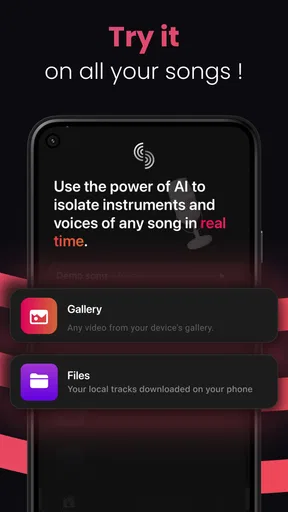
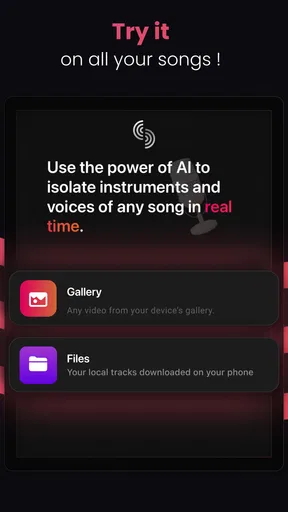
The setup is pretty straightforward. Once you’ve downloaded the app, you simply upload a track from your library or one of the supported streaming services. The app then works its AI magic, and within minutes, you have separate stems of vocals, drums, bass, and other instruments. The user interface is sleek and intuitive, making it easy to jump right into your music project.
Features That Hit the Right Notes
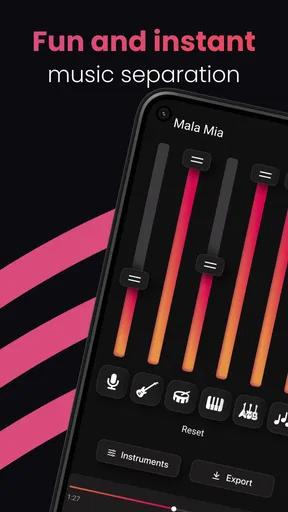
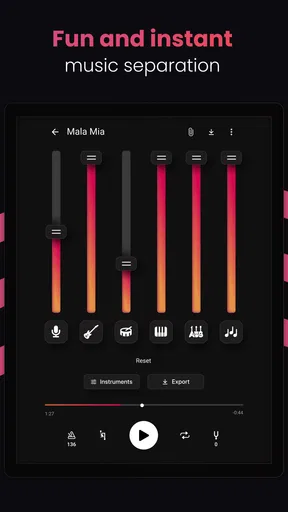
One of the standout features is the ability to adjust the volume of each stem independently. So, if you’re working on improving your guitar skills, you can lower the volume of the other instruments and focus solely on the guitar. It’s like having your personal backing band that plays exactly what you need.
Another cool feature is the real-time effects you can apply to each stem. Want to hear what a song sounds like with a heavier bass? No problem. Just tweak the settings, and you’re good to go. The precision of the AI is impressive, making these adjustments sound natural and seamless.
Perfect for Musicians and DJs
For musicians, this app is a fantastic practice tool. But it’s not just for the instrumentalists out there. If you’re a DJ or a producer, Stemz offers a treasure trove of possibilities. Remixing and sampling become a breeze when you can isolate different elements of a track with such precision.
Considerations
While the app is incredibly powerful, it does require a bit of processing power. I noticed that tracks with a lot of complex instrumentation can take a bit longer to process. Also, keep in mind that the quality of the separated stems can vary depending on the source track’s quality. But honestly, these are minor hiccups in an otherwise stellar app.
My Final Thoughts
After spending some quality time with Stemz: AI Tool for Musicians, I can confidently say it’s a must-have for anyone serious about their music. The ability to break down and manipulate songs with such ease is something I didn’t know I needed until now. Whether you’re looking to improve your skills, make your own mixes, or just have fun with your favorite tunes, this app delivers.
If you’re ready to take your music experience to the next level, give Stemz a try. You won’t be disappointed!
Choosing it for the right kind of music work
I would recommend starting with one clear goal rather than treating the app as a complete studio. For a beginner, that might be hearing the bass movement in a familiar song, checking where a vocal phrase sits against the beat, or making an accompaniment easier to sing over. For a more experienced player, it can be a quick way to inspect an arrangement away from a computer. That portable, focused use is where I see the strongest case for it.
I would be more cautious if my main priority were detailed stem editing. A separated part can contain remnants from other instruments, and that matters more when the audio will be exposed in a sparse mix. It can also be less useful if I already have access to the original multitrack session: those source tracks are the better starting point because they were not reconstructed from a finished mix. In other words, the app solves a listening problem, not every production problem.
Small habits that make practice more useful
When I use separated audio to learn a part, I try to listen in two passes. First, I play the original and follow the whole arrangement; then I focus on the reduced or isolated part. This keeps me from learning a phrase without understanding how it fits rhythmically. I also return to the full mix before practising at speed, because a part that sounds obvious on its own can feel different when the other instruments come back in.
For a difficult section, I would work in short chunks rather than repeatedly processing or replaying an entire song. A verse transition or chorus entrance can reveal more than a long, unfocused listen. If the result sounds muddy, I would compare it with the original and ask whether the source itself has overlapping parts. That is a more useful diagnosis than assuming every rough edge can be fixed by adjusting levels.
Deciding whether to pay
Because the app is free to install but includes paid in-app items, I would explore the basic workflow before spending anything. First confirm that the kind of source you want to use is accessible in your setup, then test whether the separation is useful on music you actually care about. Only after that would I compare a paid option with my needs. The range of purchase prices makes it especially sensible to read the in-app details carefully rather than assume every item unlocks the same thing.
That approach also answers a practical question: is it suitable for someone who only wants occasional karaoke or practice? It may be worth trying if the free experience covers that use, but I would not buy on the promise of perfect isolation. If your work depends on clean, export-ready parts, test the exact workflow first or choose software built around deeper editing and production control.
Who should skip it
I would skip Stemz if I only need a standard player, if I already have clean stems from a project, or if I cannot tolerate artifacts in separated audio. I would also avoid relying on it as the sole source for professional remix material. A DJ can use separated parts to explore an idea, but a public performance or release raises both quality and permission questions that the separation process does not settle.
For a curious listener, a learner, or a musician who wants a convenient way to hear familiar music differently, those limits may be perfectly acceptable. Stemz is at its best as a practical listening companion: useful when it helps me notice something, less compelling when I expect it to replace a recording setup or deliver flawless parts from every source. I would try it with a modest goal and keep the original recording close by; that is the fairest way to decide whether it belongs in my music routine.
Pros
- User-friendly interface for easy navigation.
- Impressive AI accuracy in isolating tracks.
- Supports multiple audio formats seamlessly.
- Quick processing time for track separation.
- Ideal for both beginners and professionals.
Cons
- Limited free version features available.
- Requires internet for full functionality.
- Occasional lags on older devices.
- Subscription model might be costly.
- Some tracks lose quality in separation.
FAQs for Stemz: AI Tool for Musicians
What is Stemz: AI Tool for Musicians and how does it work?
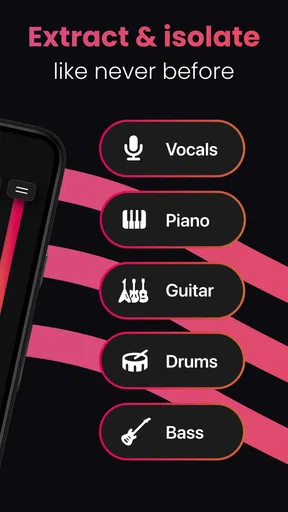
Stemz is an AI-powered application designed to assist musicians by separating audio tracks into individual stems. This means you can isolate vocals, drums, bass, and other instruments from any song. Using advanced algorithms, Stemz provides high-quality separation, making it an invaluable tool for practice, remixing, or creating backing tracks.
Is Stemz available for both Android and iOS?
Yes, Stemz is available for both Android and iOS platforms. You can download it from the Google Play Store for Android devices and the Apple App Store for iOS devices. This ensures that musicians can access its powerful features regardless of their device choice.
Does Stemz require an internet connection to function?
Stemz requires an internet connection to process audio files because the separation of tracks is performed using cloud-based AI technology. Once the tracks are separated, you can use them offline, but the initial processing needs a stable internet connection to ensure high-quality results.
Are there any subscription fees or in-app purchases in Stemz?
Stemz offers a free version with basic features, but to access advanced capabilities like higher quality stem separation or unlimited usage, subscription plans or in-app purchases might be available. These options provide enhanced functionality, making it suitable for both casual users and professional musicians.
What audio formats does Stemz support for processing?
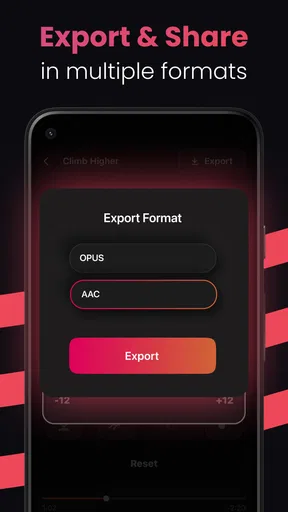
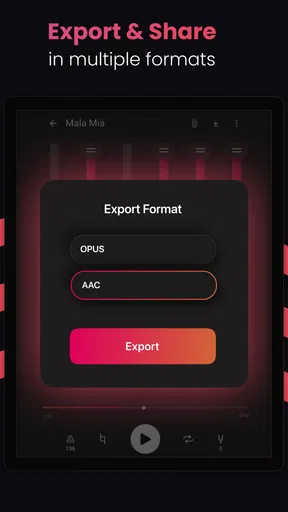
Stemz supports a wide range of audio formats, including MP3, WAV, and FLAC, ensuring flexibility for users with different sources of music. This compatibility means you can work with most standard audio files, making it easier to integrate into your existing music projects.


